Notedry: Integrating a Unique Display Font into Professional Design Workflows
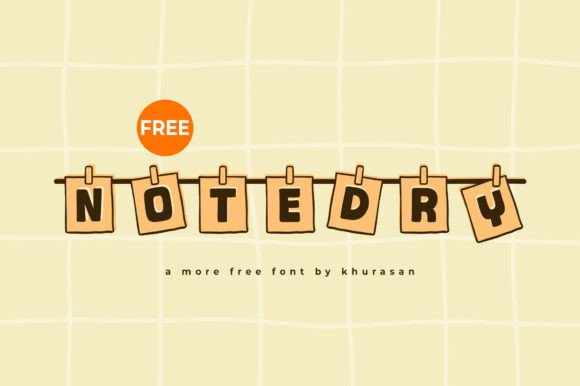
Selecting the right typeface is rarely just an aesthetic choice; it is a strategic decision that defines the tone, readability, and commercial viability of a project. Notedry enters this space as a modern, unique, and cute display font designed specifically for high-impact visual communication. Unlike versatile body text families meant for long-form reading, Notedry serves a distinct functional role within the creative process. It acts as a primary visual anchor for posters, logos, magazines, book covers, and banners. Understanding where this specific asset fits into your broader design workflow ensures that its playful yet professional character enhances rather than distracts from your core message.
Defining the Role of Display Typography in Project Planning
Before opening any design software, effective planning requires categorizing typographic needs. In the pre-production phase, designers and marketers must distinguish between structural typography and expressive typography. Notedry falls firmly into the expressive category. Its utility lies in its ability to convey personality instantly. When mapping out a brand identity system or an editorial layout, identify the specific touchpoints where emotional connection takes precedence over information density.
For entrepreneurs and small business owners developing a new product line, this distinction is critical during the mood boarding stage. If the goal is to signal approachability, creativity, or modern nostalgia, Notedry provides a shorthand for these attributes. However, practical implementation demands restraint. During the planning phase, establish clear hierarchy rules. Determine exactly where this display font will appear—typically headlines, logotypes, or short call-to-action elements—and select a complementary sans-serif or serif for supporting text. This upfront organization prevents scope creep and maintains visual consistency across multiple deliverables.
Technical Integration and Software Compatibility
Integrating a specialized font like Notedry requires attention to technical workflows to ensure quality across different media. Whether you are working in Adobe Illustrator, Figma, Canva, or Procreate, proper font management is the first step in execution. For professionals managing multiple client projects, using font activation tools (such as FontBase or Suitcase Fusion) allows you to load Notedry only when needed, keeping system performance optimized and licensing organized.
When moving from concept to production, consider the technical constraints of the output format:
- Vector vs. Raster: For logos and large-format banners, always utilize Notedry in vector format to preserve edge sharpness at any scale. Avoid rasterizing text until the final export stage.
- Web Implementation: If using the font for digital banners or landing pages, verify licensing for web embedding. Test rendering across browsers to ensure the "cute" aesthetic does not degrade due to hinting issues on low-resolution screens.
- OpenType Features: Check if the font file includes alternates, ligatures, or swashes. Utilizing these features transforms a standard installation into a custom lettering piece, adding unique value to book covers and magazine mastheads without requiring manual illustration.
Compatibility extends beyond software. It also involves team alignment. If you are collaborating with external printers or developers, include Notedry in your asset handoff package or provide outlined files to prevent substitution errors that could compromise the design’s integrity.
Execution Strategies for Specific Use Cases
The practical application of Notedry varies significantly depending on the medium. A workflow that succeeds for a logo may fail for a poster. Adapting your execution strategy to the specific use case maximizes the font's effectiveness.
Brand Identity and Logo Design
In branding, uniqueness is a functional requirement to secure trademark protection and market recognition. Notedry’s distinct character shapes provide a strong foundation, but they should rarely be used "as-is" for a professional logotype. Treat the font as raw material. Convert text to outlines and modify anchor points to create proprietary letterforms. Adjust kerning meticulously; display fonts often require tighter spacing than default settings suggest to create a cohesive wordmark. This customization process bridges the gap between using a template and creating a bespoke brand asset.
Editorial and Publishing Layouts
For magazines and book covers, Notedry functions as a pacing mechanism. In a dense editorial spread, a bold, stylized headline breaks visual monotony and guides the reader’s eye. When implementing this in a layout workflow, focus on contrast. Pair the font’s organic, playful forms with rigid grid structures and clean body copy. This tension creates a sophisticated balance that appeals to adult audiences while retaining the font’s inherent charm. Ensure that leading and tracking are adjusted optically for large sizes, as metrics designed for 12pt text often look awkward at 72pt or larger.
Marketing Collateral and Social Media
Speed and legibility drive marketing workflows. For social media graphics and promotional banners, Notedry must communicate effectively at thumbnail size. Test designs at reduced scales early in the creation process. If the intricate details of the "cute" aesthetic become muddy on mobile devices, simplify the treatment or increase weight. In this context, the font serves as a hook; support it with high-contrast color palettes and ample negative space to ensure immediate comprehension during rapid scrolling.
Pairing and Hierarchy: Maintaining Professional Balance
A common pitfall when working with highly stylized display fonts is allowing them to overwhelm the composition. Successful integration relies on deliberate pairing strategies. Notedry possesses significant visual weight and personality, which necessitates a supportive partner typeface that recedes visually.
Consider the following pairing frameworks based on project goals:
- Neutral Grounding: Pair with a geometric sans-serif (e.g., Inter, Helvetica Now) to let Notedry serve as the sole source of ornamentation. This is ideal for corporate rebrands seeking to soften their image without losing authority.
- Classical Contrast: Combine with a traditional serif for book covers or luxury packaging. The juxtaposition of modern playfulness and historical formality creates depth and narrative interest.
- Monochromatic Texture: Use varying weights of a single neutral family alongside Notedry to maintain strict minimalism. This approach works well for art prints and gallery posters where the typography itself is the subject.
Hierarchy is not just about size; it is about sequence. Establish a typographic style guide before beginning production. Define specific roles: Notedry for Level 1 headers only, a secondary sans-serif for subheads, and a highly readable serif for body text. Documenting these rules ensures consistency, especially when multiple designers contribute to a campaign or publication series.
Quality Control and Long-Term Asset Management
The final phase of the workflow involves validation and archiving. Quality control for display typography differs from body text; optical correction is paramount. Never rely solely on automated kerning pairs. Review every headline individually, adjusting spacing based on the specific letter combinations present. What looks correct in a design file may shift during export or printing, so physical proofs or cross-device testing are essential verification steps.
From a business perspective, manage Notedry as a licensed asset. Keep records of purchase receipts and license terms, particularly regarding commercial use, number of users, and webfont allowances. As projects conclude, archive source files with embedded fonts or outlined text to ensure future editability regardless of software updates. For agencies and freelancers, creating a internal library of pre-approved Notedry treatments, textures, and pairings can accelerate future workflows. This turns a one-time font purchase into a reusable system component, improving efficiency and maintaining brand continuity across diverse client work.
Evaluating Outcomes and Iteration
Post-project analysis helps refine how you utilize distinctive typefaces. Gather feedback specifically regarding the typography’s performance. Did the "cute" aspect resonate with the target demographic, or did it undermine perceived value? For digital projects, analyze click-through rates on banners featuring Notedry versus previous iterations. For print, assess shelf impact and legibility in real-world environments.
Treat typography selection as an iterative process. Just because Notedry worked exceptionally well for a boutique bakery’s rebrand does not guarantee identical success for a tech startup’s event banner. Context dictates utility. By documenting what worked and what required adjustment, you build institutional knowledge that informs future creative decisions. This reflective practice transforms font selection from a subjective preference into a data-informed design strategy.
Ultimately, Notedry is a tool for differentiation. Its value is realized not through novelty alone, but through disciplined integration into professional workflows. By approaching its use with the same rigor applied to grid systems, color theory, and content strategy, creators can harness its unique character to produce work that is both lovely and commercially effective. Whether you are designing a single poster or overhauling a comprehensive brand identity, the key lies in intentional placement, technical precision, and respectful pairing. Add this resource to your creative arsenal, but more importantly, add the discipline required to make it stand out for the right reasons.