Monday Planner: A Handwritten Font for Everyday Creativity
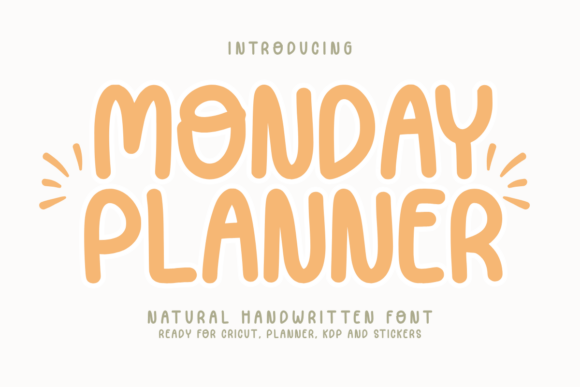
If you're looking to add a personal, approachable feel to your designs without spending hours on details, Monday Planner might be exactly what you need. This cute, handwritten font brings warmth and authenticity to a wide range of creative and practical projects. Whether you're a beginner or an experienced designer, this font is crafted to make your work easier and more visually appealing.
What Makes Monday Planner Stand Out?
Unlike generic fonts that can feel cold or impersonal, Monday Planner was designed with a natural, handwritten look that mimics real penmanship. It’s smooth, legible, and has a gentle charm that works well in both digital and print formats. The font comes in OTF and TTF formats and is fully PUA encoded, which means all characters are easily accessible no matter what design software you use.
Whether you're working in Canva, Cricut Design Space, or Procreate, you’ll find that Monday Planner integrates smoothly. It’s also cut-friendly, making it ideal for Cricut and Silhouette projects where clean lines and precision matter.
Why Use a Handwritten Font Like Monday Planner?
Handwritten fonts have a unique ability to convey warmth and sincerity. They’re often used in designs where a personal touch is important—think greeting cards, planner pages, or social media posts. Monday Planner makes it easy to achieve that look without needing advanced design skills.
For example, if you're creating a weekly planner layout, using Monday Planner for headings and notes gives it a handcrafted feel that feels intentional and inviting. Similarly, if you're designing stickers or labels for your small business or personal use, this font helps your work stand out with a soft, approachable aesthetic.
Where Can You Use Monday Planner?
The versatility of Monday Planner means it can be used in many different settings:
- Planners and Journals: Add handwritten-style headers, to-do lists, or motivational quotes.
- KDP Interiors: Enhance the readability and charm of eBooks, workbooks, or journals.
- Cricut Crafts: Create custom labels, tags, or home decor with clean, cut-ready lettering.
- T-Shirts and Merchandise: Design soft, wearable art that feels personal and expressive.
- Digital Art and Social Media: Use in Procreate or Canva for Instagram posts, quotes, or digital stickers.
Because it’s beginner-friendly, even those who are new to graphic design or crafting software can use Monday Planner confidently. It helps you focus more on your ideas and less on formatting.
Real-World Examples of Monday Planner in Action
Here are a few realistic use cases that show how Monday Planner can be applied in everyday design tasks:
- Creating a Monthly Planner: Use Monday Planner for headings like “Goals for April” or “Weekly Schedule” to give your planner a warm, handwritten appearance.
- Designing a Greeting Card: Whether digital or printed, the font’s soft curves and legibility make it perfect for heartfelt messages.
- Labeling Jars and Containers: Print labels for your kitchen or craft room using Monday Planner to keep things organized with style.
- Custom T-Shirts: Combine Monday Planner with simple shapes or icons for a minimalist, personal tee design.
- Social Media Posts: Use it in Canva to create quote graphics or promotional posts that feel more personal and engaging.
Who Should Consider Monday Planner?
Anyone who wants to add a natural, handwritten element to their work can benefit from using Monday Planner. It’s especially useful for:
- Beginners: No design experience needed—just install and start using it in your favorite tools.
- Content Creators: Ideal for bloggers, YouTubers, and influencers who want a consistent, personal brand style.
- Small Business Owners: Perfect for branding materials, product packaging, or digital downloads.
- Educators: Great for handouts, lesson plans, or digital learning materials that need a friendly tone.
- Hobbyists: Whether it’s scrapbooking, card making, or DIY gifts, this font adds a polished, personal touch.
Things to Keep in Mind When Using Monday Planner
While Monday Planner is designed to be easy to use, there are a few things to consider before diving in:
- Check Compatibility: Make sure your design software supports PUA-encoded fonts for full character access.
- Use It Thoughtfully: While it’s versatile, it’s best used for short text like headings, quotes, or labels. For long paragraphs, pair it with a clean sans-serif font for better readability.
- Test in Different Sizes: Like any font, it may look different at small or large sizes, so test it in your final format before printing or publishing.
- Look for Updates: Fonts are sometimes updated for improved performance or additional characters, so check back with the creator, Funtype Co., for the latest version.
Why Monday Planner Helps You Create Beautiful Things Faster
Designed by Funtype Co., Monday Planner is built with efficiency and aesthetics in mind. It gives you the look of real handwriting without the need for drawing or tracing. That means you spend less time tweaking and more time creating.
Instead of searching for the perfect brush font or trying to mimic handwriting manually, Monday Planner offers a ready-to-use solution that looks polished and professional. Whether you're making a quick label or designing a full journal layout, this font helps you maintain a cohesive, personal style with minimal effort.