Permanent Marker: A Versatile Font for Everyday Creativity
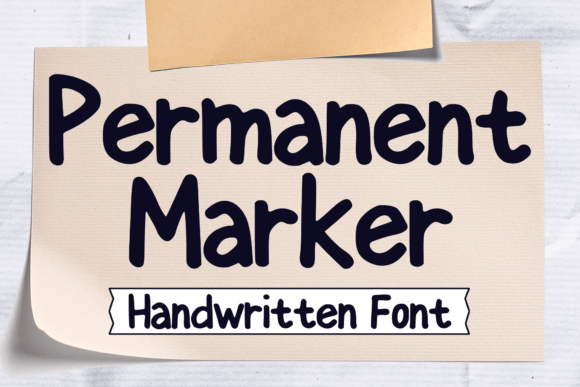
Permanent Marker is more than just a font—it’s a creative tool that brings energy and personality to your design work. With its bold, hand-drawn appearance, it mimics the look of a classic marker pen, making it ideal for projects that require a casual, expressive touch. Whether you're designing a logo, crafting a book cover, or putting together a t-shirt graphic, Permanent Marker adds visual flair without sacrificing readability.
This font fits naturally into a variety of design workflows, especially those that benefit from a handcrafted aesthetic. It’s particularly effective in branding, marketing materials, and editorial design where a youthful, energetic tone is desired. Because of its legibility at various sizes, it’s also a strong choice for digital assets like social media graphics and app interfaces.
Integrating Permanent Marker into Your Design Process
When starting a new project, consider how typography contributes to the overall message. Permanent Marker is best suited for designs that aim to feel approachable, dynamic, or creative. It’s a great option for brainstorming stages when you’re exploring visual directions and want to inject a sense of playfulness into your mockups.
During the design phase, use Permanent Marker to highlight key elements like headlines, callouts, or brand names. Its bold presence ensures it stands out while maintaining a casual tone. It pairs well with simpler sans-serif fonts for body text, allowing for a clean visual hierarchy without overwhelming the viewer.
After finalizing a design, ensure that the font renders well across different platforms and devices. Permanent Marker is web-safe and widely supported, making it a reliable choice for both print and digital applications. If you're exporting to PDF or publishing online, always double-check character encoding and font embedding settings to avoid display issues.
How Permanent Marker Works with Other Tools and Assets
Permanent Marker integrates smoothly with most major design software, including Adobe Creative Cloud apps, Figma, Sketch, and Canva. Once installed, it appears in your font menu like any other system font, allowing for quick access during layout and editing tasks.
- Use it in Adobe Illustrator for vector-based illustrations and logos
- Pair it with Photoshop for layered image compositions and digital collages
- Apply it in InDesign for magazine layouts or editorial spreads
- Utilize it in Canva for quick social media templates and promotional graphics
For web developers, Permanent Marker is available via Google Fonts, making it easy to implement in CSS. Simply add the font to your stylesheet and apply it to headers or specific UI elements to maintain a consistent brand voice across your website or application.
Practical Use Cases for Permanent Marker
One of the strengths of Permanent Marker is its versatility across different creative domains. Here are several practical applications where it shines:
- Logo Design: Especially for brands with a casual or creative identity, Permanent Marker adds a personal, hand-drawn feel that resonates well with younger audiences.
- Comic and Cartoon Illustration: Its bold lines and playful appearance make it perfect for speech bubbles and title cards in comics and animated projects.
- Product Packaging: Use it for food labels, toy packaging, or boutique branding where a fun, approachable tone is desired.
- Merchandise Design: From t-shirts to stickers, Permanent Marker stands out clearly and maintains its character even when scaled down or printed in one color.
- Editorial Design: It works well in magazine covers, book titles, and infographic headers where a strong visual hook is needed.
Preparing for Long-Term Use and Consistency
Before committing to Permanent Marker as part of your brand or design system, test it across various formats and sizes. Print a sample to see how it holds up in physical media, and preview it on mobile devices to ensure legibility on smaller screens.
For team-based projects, make sure the font is properly installed or linked across all devices to maintain consistency. If you're using it in a shared design file, embed the font or convert text to outlines if exporting as a PDF or image asset.
Consider creating reusable templates in your preferred design software that feature Permanent Marker as a default font for specific elements like headers or promotional banners. This streamlines your workflow and ensures a cohesive look across multiple deliverables.
Enhancing User Experience with Thoughtful Typography
Typography plays a critical role in user experience, and Permanent Marker offers a unique way to communicate tone and intent. It’s especially effective when you want to convey a sense of spontaneity, creativity, or friendliness. However, like any design element, it should be used intentionally and in alignment with your overall message.
When designing for accessibility, keep in mind that while Permanent Marker is readable, it may not be ideal for long blocks of text or users with visual impairments. Reserve it for short-form content such as headlines, captions, and accents where its visual impact is strongest.
Tips for Using Permanent Marker Effectively
- Pair it with neutral fonts: Use Permanent Marker for headlines and combine it with a clean sans-serif like Open Sans or Montserrat for body text.
- Limit its use: Overusing any stylized font can dilute its impact. Save it for key elements that need visual emphasis.
- Adjust spacing: Kerning and line spacing may need fine-tuning depending on the design context to ensure optimal readability.
- Use in color: Permanent Marker looks great in bold colors, not just black. Experiment with different color combinations to enhance its playful nature.
- Test across mediums: Always preview how it looks in print, on screen, and on mobile to ensure it performs well in all environments.
Conclusion: Making Permanent Marker Part of Your Creative Toolkit
Permanent Marker is more than a stylistic choice—it’s a functional font that enhances communication and visual appeal. Whether you're working on a branding project, an editorial layout, or a digital illustration, it offers a distinct voice that helps your content stand out.
By understanding how to integrate it effectively into your workflow, you can ensure that your designs maintain both personality and professionalism. From concept to execution, Permanent Marker supports creative expression while remaining practical and easy to use.