Mayonice: Integrating a Modern Handwritten Font into Professional Design Workflows
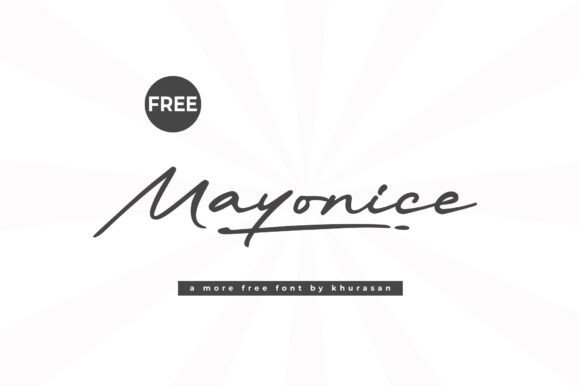
Selecting the right typeface is rarely just an aesthetic choice; it is a strategic decision that defines the tone, readability, and emotional resonance of a project. For designers, marketers, and content creators navigating the balance between professionalism and approachability, Mayonice offers a distinct solution. This modern and cute handwritten font serves as a versatile asset for posters, logos, magazines, book covers, and banners. However, owning the font file is only the first step. The true value of Mayonice lies in how effectively it is integrated into your broader creative workflow, from initial conceptualization to final production.
Unlike rigid geometric sans-serifs or traditional serifs, handwritten fonts like Mayonice introduce a layer of human texture to digital designs. Understanding where this typeface fits within your design system ensures it enhances rather than distracts from your core message. By treating typography selection as a process-oriented task, you can leverage Mayonice to create lovely designs that stand out while maintaining necessary standards of legibility and brand consistency.
Defining the Role of Mayonice in Creative Planning
Before opening design software, it is essential to determine the functional role Mayonice will play in your specific project. In professional workflows, fonts are generally categorized as either structural (body text) or expressive (display). Mayonice falls firmly into the expressive category due to its stylized, handwritten nature. Recognizing this distinction early prevents common usability issues later in the execution phase.
During the planning phase, consider the hierarchy of information. If you are designing a magazine spread or a book cover, Mayonice is best utilized for headlines, pull quotes, or accent elements rather than dense paragraphs. Its unique character shapes require more cognitive processing time for readers compared to standard body copy. Therefore, reserve this typeface for moments where you want to slow the reader down and evoke a specific feeling. For entrepreneurs and small business owners creating branding assets, this means using Mayonice for the logotype or tagline while pairing it with a highly readable neutral font for contact details and legal disclaimers.
Evaluating Project Compatibility
Not every project requires a handwritten touch. Before committing to Mayonice, evaluate the project’s objectives against the font’s inherent personality. It excels in contexts requiring warmth, creativity, nostalgia, or personal connection. Examples include:
- Lifestyle and Wellness Branding: Conveying authenticity and organic growth.
- Event Stationery: Adding a bespoke, intimate feel to invitations and signage.
- Social Media Graphics: Creating thumb-stopping visuals that feel less corporate.
- Product Packaging: Suggesting artisanal quality or handcrafted care.
Conversely, if the project demands authority, technical precision, or urgent clarity—such as financial reports, medical instructions, or emergency signage—Mayonice may introduce unnecessary friction. Aligning the typeface with the user’s intent is a critical quality control measure that saves revision time downstream.
Technical Implementation and Software Integration
Once the strategic fit is confirmed, the next phase involves technical implementation. Mayonice interacts differently across various platforms, and understanding these nuances ensures a smooth production process. Whether you are working in Adobe Illustrator, Canva, Figma, or Microsoft Word, proper installation and configuration are prerequisites for consistent output.
For professional designers using the Adobe Creative Cloud, ensure you have access to OpenType features if included with the font file. Many modern handwritten fonts contain alternate characters, swashes, or ligatures that prevent repetitive letterforms when typing words with double letters. Accessing these glyphs via the Glyphs panel allows for custom refinements that elevate the design from "typed" to "lettered." Ignoring these features often results in a mechanical appearance that undermines the purpose of choosing a handwritten style.
For marketers and educators using web-based tools like Canva or Crello, verify whether Mayonice is available in the native library or if you need to upload it as a custom font. Uploading custom assets requires checking licensing terms for commercial web use. Additionally, test the font at various sizes within the platform’s interface. Screen rendering can sometimes alter the weight or spacing of delicate handwritten strokes, so what looks perfect at 72pt on a desktop monitor may become illegible at 24pt on a mobile preview.
Establishing Effective Font Pairings
Mayonice should rarely work alone. To maintain professional polish, pair it with typefaces that provide contrast and stability. A practical workflow involves selecting a secondary font before beginning layout work. Strong pairings typically involve:
- Geometric Sans-Serifs: Fonts like Montserrat or Futura offer clean lines that ground the organic flow of Mayonice.
- Minimalist Serifs: Typefaces like Playfair Display or Lora add editorial sophistication without competing for attention.
- Monospaced Fonts: For a trendy, Gen-Z aesthetic, pairing Mayonice with a mono font creates an interesting tension between structured and unstructured forms.
Create a style guide or mood board that explicitly defines these relationships. Specify which font handles H1s, H2s, body copy, and captions. This documentation ensures consistency across multiple deliverables, especially when collaborating with other freelancers or team members who may not be familiar with the nuances of handwritten typography.
Workflow Considerations for Specific Deliverables
The application of Mayonice varies significantly depending on the final output format. Adapting your workflow to the medium prevents costly rework and ensures optimal quality.
Print Production and Pre-Press
When designing posters, book covers, or physical banners, ink spread and paper texture affect how handwritten fonts appear. Thin strokes in Mayonice may disappear on uncoated or textured paper stocks. During the pre-press phase, print physical proofs at actual size to check stroke integrity. You may need to apply a slight stroke or increase the font weight digitally to compensate for ink absorption. Additionally, always outline text or embed the font file when sending artwork to printers to avoid substitution errors that could ruin the intended aesthetic.
Digital Assets and Web Performance
For websites and digital banners, file size and loading speed are critical factors. Handwritten fonts can sometimes have larger file sizes due to complex vector paths. If using Mayonice on a website, subset the font to include only the characters actually used on the page. This reduces load times and improves Core Web Vitals scores. Furthermore, establish fallback fonts in your CSS stack. If Mayonice fails to load, the fallback should be a cursive or casual script that approximates the vibe, rather than a default serif that breaks the visual continuity.
Social Media and Content Creation
In fast-paced social media workflows, efficiency is key. Create reusable templates in Photoshop, Illustrator, or Canva with Mayonice pre-styled and positioned. This eliminates the need to adjust tracking, leading, and color settings for every new post. For video content, ensure the font remains legible against moving backgrounds by using drop shadows, backing plates, or high-contrast overlays. Test captions and lower thirds on mobile devices, as handwritten fonts can become difficult to parse on small screens when overlaid on busy video footage.
Maintaining Consistency and Quality Control
Handwritten fonts carry a higher risk of inconsistency than standard typefaces because they mimic natural variation. To maintain professional standards, implement a review checklist specifically for typography. When reviewing designs featuring Mayonice, look for awkward collisions between characters, uneven baseline alignment, or excessive repetition of identical glyphs. These subtle issues can make a design feel amateurish even if the overall concept is strong.
Organization also plays a vital role in long-term usability. Keep your font files organized in a centralized asset management system rather than scattered across desktop folders. Tag Mayonice with relevant metadata such as "handwritten," "cute," "modern," and "display" to streamline future searches. If you purchase licenses for multiple team members, maintain a clear record of seat counts and usage rights to avoid compliance issues during audits.
Enhancing Creative Outcomes Through Intentional Use
Ultimately, Mayonice is a tool for differentiation. In a saturated market, the ability to signal personality and craft through typography provides a competitive edge. However, this advantage is only realized when the font is treated as part of a holistic system rather than a decorative afterthought. By integrating Mayonice thoughtfully into your planning, technical setup, and quality assurance processes, you transform it from a simple novelty into a reliable component of your creative infrastructure.
Whether you are a freelancer pitching a new brand identity, an educator creating engaging course materials, or a business owner launching a seasonal campaign, the principles remain the same: prioritize readability, establish clear hierarchies, and respect the technical constraints of the medium. When these practical considerations guide your creative decisions, Mayonice becomes more than just a pretty face; it becomes a functional asset that helps your work resonate with audiences and achieve tangible results. Add this amazing font to your creative ideas, but do so with the intentionality required to make those ideas truly stand out in a professional context.