Evaluating Roger Lavienna: A Practical Guide to Modern Serif Typography with Decorative Features
Selecting the right typeface for a branding project, editorial layout, or digital presentation often involves balancing aesthetic appeal with technical functionality. Roger Lavienna occupies a specific niche in this decision-making process as a hybrid serif that bridges classical proportions with contemporary decorative elements. For designers and creatives aged 20 to 50 who are currently auditing their font libraries or sourcing new assets, understanding the specific utility of this typeface is essential. It is not merely a stylistic choice but a functional tool that includes built-in ligatures and ornamental glyphs. This analysis explores where Roger Lavienna fits within the broader typographic landscape, how its unique features compare to standard alternatives, and the practical considerations for integrating it into professional workflows.
Defining the Hybrid Serif Category
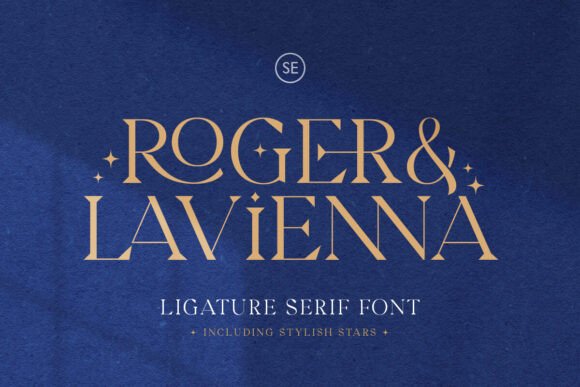
Roger Lavienna is best categorized as a modern serif with classical roots. Unlike strict revivals of historical typefaces or purely geometric modern serifs, it attempts to merge the readability and warmth of traditional letterforms with the sharpness required for current design trends. The primary distinction lies in its extensive set of ligatures. In many standard serif families, ligatures are either absent or limited to common pairs like "fi" and "fl." Roger Lavienna expands this significantly, offering gorgeous ligatures designed specifically to enhance logos, headlines, and display text. These connections are not automatic kerning adjustments; they are custom-drawn glyph substitutions that create a fluid, handwritten quality within a structured serif framework.
When comparing this approach to other options, consider the difference between a dedicated script font and a serif with ligatures. Script fonts offer flow but often sacrifice legibility at smaller sizes or in longer formats. Standard serifs offer legibility but can feel static in logo applications. Roger Lavienna aims to solve this tradeoff by providing a stable serif skeleton that transforms into a display asset through its ligature set. This makes it particularly relevant for projects requiring a unified visual language across both headline and subhead applications without switching type families.
Integrated Ornamentation vs. External Assets
A significant factor in evaluating Roger Lavienna against similar resources is its inclusion of stylish stars and ornamental glyphs. Historically, designers have had to source separate dingbat fonts, vector packs, or illustration assets to add sparkle or decorative accents to a layout. This fragmentation creates workflow inefficiencies and potential licensing complications. Roger Lavienna integrates these elements directly into the font file. Users can access specific star variations by typing the characters A followed by numbers 1 through 5. This keystroke mapping allows for rapid iteration during the design phase without leaving the text editing environment.
This integration offers distinct advantages over external graphic elements. Because the ornaments are part of the typeface, they share the same weight, contrast, and optical sizing as the letterforms. This ensures visual consistency that is difficult to achieve when mixing fonts with standalone vector graphics. However, there are tradeoffs. The ornaments are bound to the font’s resolution and scaling behavior. If a project requires highly complex, multi-colored, or textured illustrations, the built-in stars may be too simplistic. In such cases, Roger Lavienna serves best as a complementary accent system rather than a replacement for bespoke illustration. Designers should assess whether the provided five star variations offer sufficient variety for their specific project scope before committing.
Technical Specifications and Workflow Compatibility
For professionals managing international campaigns or diverse client rosters, technical specifications are as critical as aesthetics. Roger Lavienna supports multiple languages, which extends its utility beyond English-centric projects. This multilingual support is vital for brands operating in global markets where consistent typography across different scripts maintains brand integrity. When comparing typefaces, always verify the specific language coverage against your project requirements, as "multi-language" can vary significantly between foundries.
Furthermore, the font is PUA (Private Use Area) encoded. This is a crucial technical detail for users working in software that does not fully support OpenType features or for those using Cricut, Silhouette, and other crafting/cutting machines. PUA encoding maps special characters, ligatures, and ornaments to specific Unicode points that are accessible even in basic text editors or non-design software. While professional design applications like Adobe Illustrator or Affinity Designer can access these glyphs via OpenType panels, PUA encoding ensures accessibility across a wider ecosystem. If your workflow relies heavily on tools with limited typographic controls, this feature elevates Roger Lavienna above standard commercial fonts that restrict special characters to OpenType-savvy environments only.
Comparative Analysis: Strengths and Limitations
To make an informed decision, it is necessary to weigh Roger Lavienna’s strengths against its limitations relative to other market options. Understanding these factors helps prevent mismatched expectations.
Where Roger Lavienna Excels
- Cohesive Branding Systems: The combination of text and ornamentation within a single family reduces the friction of maintaining visual consistency.
- Logo and Display Work: The extensive ligature set provides custom-lettering aesthetics without the cost or time investment of hand-lettering.
- Cross-Platform Accessibility: PUA encoding makes it versatile for both professional designers and content creators using consumer-grade tools.
- Editorial Accents: The integrated stars function effectively as bullet points, section dividers, or margin notes in magazines and digital publications.
Potential Tradeoffs and Considerations
- Body Text Suitability: While readable, the decorative nature of the ligatures and the specific contrast ratio may make it less optimal for dense, long-form body text compared to neutral workhorse serifs.
- Ornament Flexibility: With only five star variations accessed via specific keystrokes, users needing extensive decorative libraries may still require supplementary assets.
- Stylistic Specificity: The blend of classic and modern is distinctive, but it may clash with ultra-minimalist or strictly historical design directions. It occupies a middle ground that may not satisfy purists of either extreme.
- Licensing Scope: As with any specialized display font, verify that the license covers all intended mediums, especially if using the PUA-encoded glyphs in merchandise or embedded web formats.
Decision Framework for Selection
Choosing Roger Lavienna should be based on specific project parameters rather than general preference. It is most appropriate when the design brief calls for elegance with a touch of whimsy or luxury. If you are designing a wedding invitation suite, a boutique cosmetics label, a fashion editorial header, or a premium packaging concept, the ligatures and stars provide immediate value. The font performs best when given space to breathe; tight tracking or small point sizes may obscure the very details that define it.
Conversely, if your primary need is high-density information architecture, user interface text, or corporate documentation requiring maximum neutrality, a more utilitarian serif or sans-serif would likely be a superior choice. Roger Lavienna is a character actor, not an extra. It draws attention and sets a tone. Evaluate your hierarchy: if the typeface will serve as the primary voice of the brand identity, its personality is an asset. If it is meant to recede and facilitate reading without emotional inflection, explore alternatives with lower contrast and fewer decorative features.
Practical Implementation Tips
For those deciding to integrate Roger Lavienna into their workflow, maximizing its potential requires intentional usage. First, familiarize yourself with the glyph panel in your design software. While the A+1-5 shortcut is convenient for quick access, browsing the full glyph set reveals additional alternates and ligatures that may not be immediately obvious. Second, test the ligatures in context. Some connections look beautiful in isolation but may create awkward spacing when combined with adjacent characters. Manual kerning adjustments are often necessary to maintain rhythm when using heavy ligature substitution.
Finally, consider the interaction between the stars and the surrounding negative space. Because these ornaments are typographic elements, they align to the baseline and cap height. Use this alignment to create structured decorative borders or centered motifs rather than placing them arbitrarily. Treating the stars as text elements rather than floating graphics leverages the font’s engineering and results in cleaner, more professional compositions. By understanding both the creative possibilities and the technical boundaries of Roger Lavienna, designers can effectively determine whether it is the precise tool needed for their next typographic challenge.