Doodle Hand Drawn: A Playful Dingbat Font Guide
Adding a personal touch to digital designs often requires switching between illustration software and layout tools, but Doodle Hand Drawn simplifies this workflow entirely. This unique typeface is not designed for reading text in the traditional sense; instead, it functions as a comprehensive library of hand-sketched assets mapped directly to your keyboard. Each letter from A to Z and every number from 0 to 9 corresponds to a specific doodle illustration, allowing creators to insert decorative elements as easily as typing a sentence.
The primary appeal of this dingbat font lies in its ability to bridge the gap between polished digital design and organic, handmade aesthetics. For professionals and hobbyists alike, maintaining a consistent sketchy style across multiple projects can be time-consuming when drawing manually. By utilizing this font, you gain instant access to a cohesive set of marker-style illustrations that retain a charmingly imperfect look. This warmth is essential for projects that need to feel approachable, authentic, and human-centric rather than sterile or overly corporate.
Understanding the Visual Library
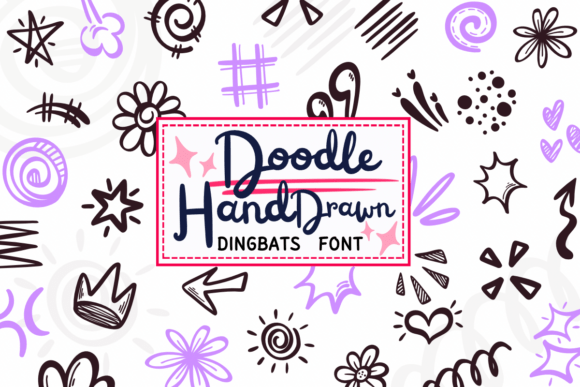
Before incorporating any decorative font into a project, it is helpful to understand exactly what visual vocabulary it provides. The Doodle Hand Drawn collection covers a broad spectrum of whimsical elements that serve distinct functional and aesthetic purposes within a layout. These are not random scribbles; they are categorized motifs designed to solve common design challenges.
- Celestial and Light Effects: The font includes simple five-pointed stars, bursts, sparkles, and twinkling effects. These are perfect for highlighting key information, creating a sense of magic, or filling negative space without adding visual heaviness.
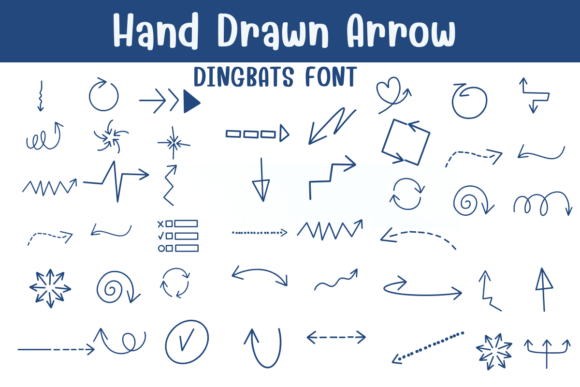
- Directional Shapes: Communication often requires guiding the viewer’s eye. This collection features playful arrows, zig-zags, squiggly lines, and spirals that direct attention more organically than standard geometric vectors.
- Nature-Inspired Motifs: To soften a design, the font offers flowers, sun-like swirls, and leafy doodles. These elements introduce organic curves that contrast well with rigid grid layouts and straight text lines.
- Emphasis and Accents: Functional typography needs support. Included crowns, quotation marks, dots, hearts, scribbles, and comic-style emphasis lines allow you to create hierarchy and focus points that mimic hand-annotated notes.
All these elements share a unified marker-drawn texture. This consistency ensures that even if you use twenty different glyphs in a single composition, they will appear as though they were sketched during the same creative session.
Practical Applications for Creators and Businesses
Versatility is a defining characteristic of the Doodle Hand Drawn font. Because the assets are vector-based (when used in compatible software) or high-resolution raster images, they scale effectively across various mediums. Understanding where this tool fits best can help maximize its value in both personal and commercial contexts.
Digital Planning and Journaling
The digital planning community relies heavily on visual cues to make functional calendars engaging. Instead of importing separate PNG stickers for every page, planners can type out a string of characters to create custom dividers, headers, and bullet points. The imperfect line quality mimics the experience of writing on paper with a felt tip pen, which is crucial for users seeking a tactile feel in a digital environment. This application extends to printable journals where the doodles serve as prompts or decorative borders.
Social Media and Content Marketing
In an era of algorithmic feeds, stopping the scroll requires visuals that stand out. Small business owners and social media managers can use these doodles to frame quotes, highlight sale prices, or add personality to announcement graphics. The hand-drawn nature signals authenticity, which can increase engagement rates compared to stock photography or generic clip art. For educators and coaches, these friendly illustrations help break down complex information into digestible, less intimidating visual chunks.
Physical Products and DIY Crafts
For those involved in physical product creation, this font serves as a rapid prototyping and production tool. Scrapbookers can print sheets of doodles to cut out as embellishments. Sticker makers can generate entire sticker sheets by simply typing out rows of characters. The consistent stroke weight means that whether you are designing a t-shirt graphic or a greeting card, the ink density remains uniform, ensuring professional printing results.
Streamlining Creative Workflows
Efficiency is just as important as aesthetics for freelancers and entrepreneurs. Traditional illustration workflows involve sketching, inking, digitizing, cleaning up paths, and organizing files. Doodle Hand Drawn eliminates these intermediate steps. When you need a starburst to emphasize a "New Arrival" tag on an e-commerce banner, you simply select the corresponding key. This immediacy keeps creative momentum flowing and prevents technical friction from stalling ideas.
Furthermore, because the elements are contained within a font file, they are universally compatible. You do not need specialized illustration software like Adobe Illustrator or Procreate to use them. They work seamlessly in word processors, presentation software, basic photo editors, and advanced design platforms. This accessibility makes high-quality decorative elements available to beginners who may not yet have mastered complex vector tools, while still offering speed benefits to seasoned professionals.
Important Considerations Before Use
While this typeface is incredibly useful, treating it correctly ensures the best results. There are specific nuances to working with dingbat fonts that differ from standard typography.
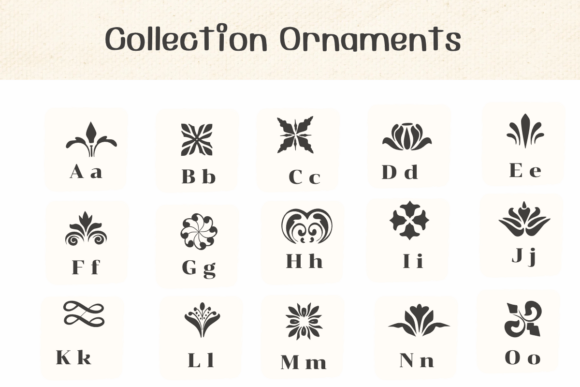
- Memorization vs. Discovery: Since the glyphs replace letters, typing "A" might produce a flower while "B" produces a heart. Beginners should keep a reference chart handy or use the operating system’s character map utility to visually browse available glyphs until they memorize the layout.
- Licensing Verification: Always review the specific license agreement included with the download. While many doodle fonts allow for personal use, commercial applications—such as selling stickers, templates, or branded merchandise—often require a separate commercial license. Respecting intellectual property protects your business from legal issues.
- Scaling and Resolution: If using the font in raster-based programs like Photoshop or Canva, ensure you are working at a high resolution (300 DPI for print). Typing the character at a small size and then stretching it can result in pixelation. It is better to type the glyph at a large point size initially to maintain crisp edges.
- Color Flexibility: Remember that these are font characters, not flattened images. This means you can change their color instantly using the text color tool. This flexibility allows you to adapt the same doodle set to match any brand palette or seasonal theme without needing to edit individual image files.
- Spacing and Kerning: Hand-drawn elements often have irregular bounding boxes. You may need to adjust tracking or kerning to prevent doodles from overlapping awkwardly or appearing too spaced out. Treating them as typographic elements rather than static images gives you precise control over composition.
Integrating Doodle Hand Drawn into your creative toolkit offers a unique blend of efficiency and artistic expression. It solves the problem of needing bespoke decoration without the time investment of custom illustration. Whether you are enhancing a client presentation, designing a product line, or simply making your personal planner more joyful, this font provides the building blocks for warmer, more engaging visual communication. By understanding its contents, applications, and technical requirements, you can leverage this playful resource to elevate your work with genuine handmade character.