Break Roman: A Bold Fusion of Tradition and Modernity
What Makes Break Roman Stand Out?
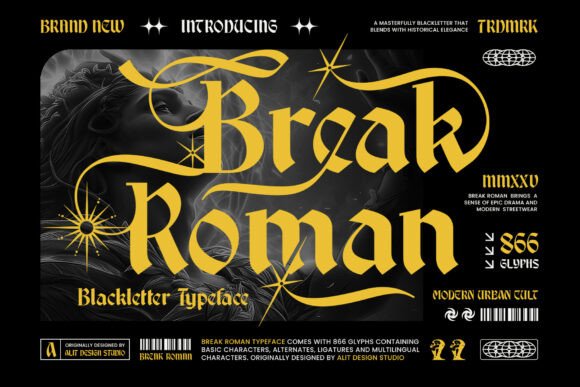
Break Roman is not just another typeface—it’s a dramatic typographic statement. Crafted by Alit Design Studio, this display font seamlessly blends the ornate gravitas of blackletter tradition with the clarity and structure of modern serif design. With its sharp angles, vertical stress, and dark elegance, Break Roman brings a sense of historical weight to contemporary design while maintaining readability and adaptability.
Whether you're working on luxury editorial layouts, urban streetwear branding, or mystical album covers, Break Roman delivers a unique visual punch. Its swashes flow like celestial ribbons, and its custom starburst glyphs add an air of mysticism—perfect for designers looking to evoke both rebellion and refinement.
Common Mistakes When Using Break Roman
Despite its striking appearance, Break Roman is often misused, especially by those who underestimate the importance of typographic context and application. Here are some common pitfalls and how to avoid them.
1. Using Break Roman for Body Text
One of the most frequent errors is using Break Roman in long blocks of body text. While its legibility is better than traditional blackletter fonts, it's still a display typeface—meant for headlines, titles, and impactful short phrases.
Why it's a problem: Prolonged reading in Break Roman can cause visual fatigue due to its dense structure and decorative elements.
Better approach: Pair Break Roman with a clean, highly legible sans-serif or serif font for body text. For example, use it for headings and subheadings while relying on a font like Helvetica or Georgia for paragraph content.
2. Overlooking Licensing Details
Many designers jump into using Break Roman without checking the licensing terms. Some versions may be restricted to personal use only, which can lead to legal issues when used in commercial projects.
Why it's a problem: Unauthorized use in commercial settings can result in fines or the need to repurchase or replace the font mid-project.
Better approach: Always verify the license before downloading or purchasing. Visit the official Alit Design Studio website or trusted font marketplaces like MyFonts or Adobe Fonts to ensure you’re getting the correct version for your intended use.
3. Misjudging Context and Audience
Break Roman’s dramatic style can easily overpower a design or clash with the intended tone if not used thoughtfully. It carries strong visual associations—medieval, mystical, rebellious, luxurious—so it may not suit every project.
Why it's a problem: Inappropriate use can confuse your audience or make your design appear unprofessional.
Better approach: Consider your brand identity and audience expectations. Break Roman works exceptionally well in fashion branding, editorial design, and music-related visuals. If you're designing for a corporate finance report or a minimalist tech startup, you might want to explore more neutral typefaces.
4. Ignoring Kerning and Spacing
Because of its intricate letterforms and swashes, Break Roman requires careful attention to spacing. Auto-kerning in design software may not always produce the best results.
Why it's a problem: Poor spacing can make text appear cluttered or uneven, reducing readability and visual appeal.
Better approach: Manually adjust tracking and kerning, especially in logo work or large-format prints. Use optical margin alignment and consider alternate glyphs to prevent collisions between swashes and adjacent letters.
What to Check Before Downloading or Buying Break Roman
Before you commit to using Break Roman, evaluate the following factors to ensure it aligns with your project goals and technical requirements:
- Character Set: Confirm that the font includes the necessary glyphs for your language and special characters (e.g., accented letters, currency symbols).
- File Formats: Make sure the package includes OpenType (.otf) and TrueType (.ttf) formats for cross-platform compatibility.
- Alternate Glyphs: Check if the font offers stylistic alternates, swashes, and ligatures—these can greatly enhance your design’s uniqueness and flexibility.
- Technical Support: Look for a vendor or designer who offers support or documentation, especially if you're using the font in complex or large-scale projects.
Pairing Break Roman Effectively
Break Roman shines when paired with complementary fonts that balance its intensity. Here are a few practical combinations:
- Luxury Editorial: Use Break Roman for headlines with a serif like Didot or Garamond for body text.
- Streetwear Branding: Pair with bold sans-serif fonts like Futura or Impact for a high-contrast, edgy look.
- Mystical or Occult Themes: Combine with script fonts or minimalist monospaced fonts to create a layered, mysterious aesthetic.
Getting the Most from Break Roman
To truly make Break Roman work for you, consider these practical tips:
- Use It Sparingly: Let Break Roman be the visual anchor of your design. Limit its use to titles, logos, or accent text to maintain its impact.
- Test in Different Sizes: Preview the font at various sizes, especially if it will be used on physical materials or mobile screens.
- Experiment with Color and Contrast: Break Roman looks stunning in metallic finishes, deep blacks, or stark white-on-black layouts. Don’t be afraid to play with contrast and texture.
- Respect Its Heritage: Understand the cultural and historical context of blackletter typefaces. This awareness can inform more thoughtful and respectful design choices.
Conclusion
Break Roman is a powerful typographic tool that, when used correctly, can elevate your design from ordinary to extraordinary. Its blend of medieval elegance and modern precision makes it a versatile choice for a wide range of creative applications.
By avoiding common mistakes—like using it for body text, ignoring licensing terms, or misjudging context—you’ll ensure that your work remains professional, effective, and visually compelling. Take the time to understand its features, test its application, and pair it wisely, and Break Roman will become a standout element in your design toolkit.