Vandria: A Practical Guide to Using This Modern Sans Serif Effectively
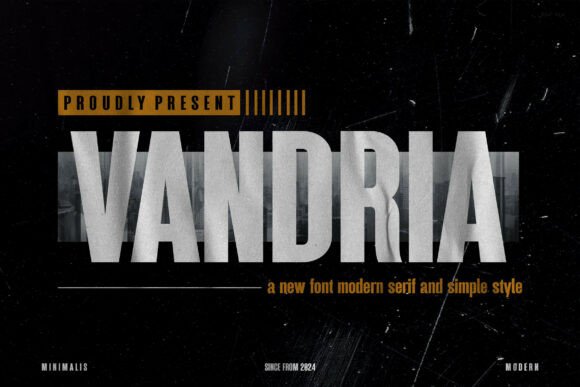
Vandria has quickly established itself as a go-to choice for designers and business owners seeking a modern, neat sans serif typeface. Its appeal lies in its deceptive simplicity; the clean lines and balanced proportions offer a sleek, minimalist aesthetic that feels both fresh and professional. However, the very neutrality that makes Vandria so versatile is also where many users stumble. Because it is designed for clarity, it is often treated as a "set it and forget it" solution, leading to layouts that feel sterile or, worse, illegible across different media.
If you are considering Vandria for branding, web design, or editorial projects, it is crucial to look beyond the specimen sheet. Understanding how this typeface behaves in real-world applications will save you from costly redesigns and ensure your communication remains effective. Here is a practical breakdown of common pitfalls and how to leverage Vandria’s strengths correctly.
The Trap of Assuming Minimalism Equals Automatic Legibility
A frequent misunderstanding among beginners and even seasoned marketers is that a clean font like Vandria guarantees readability at any size. While Vandria boasts excellent proportions, its minimalist construction means there is less visual noise to guide the eye. When used too small on digital screens or in low-contrast print environments, those clean lines can disappear.
The Correction: Never rely solely on the default point size suggested by your design software. For web body copy, test Vandria at 16px or higher, depending on the x-height rendering on your target devices. In print, ensure your ink spread and paper texture do not cause the thinner strokes to vanish. Always conduct legibility tests in the actual environment where the content will be consumed, not just on your high-resolution design monitor.
Overlooking Weight Hierarchy in Branding
Vandria’s versatility is one of its selling points, but this can lead to lazy hierarchy decisions. Many entrepreneurs select Vandria for a logo or headline because it looks sharp, then use the same weight for subheads and body text, assuming the font family will naturally differentiate itself. This results in a flat visual experience where nothing stands out, confusing readers about what information matters most.
To avoid this, you must actively manage typographic contrast. Do not assume that switching from Regular to Bold is enough. Consider these adjustments:
- Combine weights deliberately: Pair Vandria Light for large display headers with Vandria Medium or Semibold for body text to create tension rather than relying on standard pairings.
- Utilize spacing: Increase tracking (letter-spacing) on uppercase Vandria headlines to enhance the minimalist aesthetic while improving distinctiveness from body copy.
- Test grayscale first: Evaluate your hierarchy in black and white before adding color. If the structure fails without color, Vandria’s weights are not being utilized effectively.
Misapplying Vandria in Long-Form Editorial Contexts
Vandria shines in short bursts—headlines, UI elements, and captions. However, some editors and bloggers attempt to use it for dense, long-form articles without adjusting typesetting parameters. Because it is a geometric-leaning sans serif, extended reading sessions can become fatiguing if the line length and leading (line height) are optimized for serif fonts or humanist sans serifs.
The Better Approach: Treat Vandria differently than you would a traditional book font. Increase your line height to at least 1.5 or 1.6 for body text to give the characters room to breathe. Shorten your line length to 45–60 characters per line. The open counters of Vandria need whitespace to maintain their clarity over long paragraphs. If you cannot adjust these parameters due to platform limitations, consider reserving Vandria for headings and navigation while pairing it with a more robust reading font for the main text.
Neglecting Technical Compatibility and Licensing
A purely aesthetic evaluation of Vandria often leads to operational headaches later. Users frequently download or purchase the font based on how it looks in a static image, only to discover issues when implementing it across platforms. Common oversights include missing variable font support, lack of specific language glyphs, or licensing restrictions that prohibit certain commercial uses like app embedding or e-book distribution.
Before committing to Vandria for a major project, run through this technical checklist:
- Verify character sets: Ensure the version you acquire includes all necessary diacritics, symbols, and currency signs required for your specific audience or market.
- Check web performance: If using Vandria on the web, inspect the file size. Subset the font to include only the characters you actually use to prevent slow load times that hurt SEO and user experience.
- Confirm license scope: Read the EULA carefully. Desktop licenses rarely cover webfont usage, server-side PDF generation, or mobile app embedding. Buying the wrong license is an expensive mistake that usually surfaces during a legal audit or platform submission.
- Test cross-browser rendering: Geometric sans serifs can render inconsistently on Windows versus macOS. Verify that Vandria maintains its intended proportions and hinting across Chrome, Safari, Firefox, and Edge.
Balancing Neutrality with Brand Personality
Because Vandria is designed to be neutral and versatile, there is a risk that your brand identity may end up looking generic. Many small business owners and freelancers choose it specifically because it is "safe," but safety should not come at the cost of distinctiveness. Relying entirely on the font to carry your brand voice is a strategic error.
Practical Advice: Use Vandria as a canvas, not the entire painting. Inject personality through color palettes, photography style, illustration, and micro-copy tone. Let the typography provide the structural clarity while other brand elements provide the emotional resonance. Additionally, explore Vandria’s OpenType features. Stylistic alternates, ligatures, or tabular figures can add unique typographic flavor that distinguishes your application of the font from thousands of others using the same typeface.
Evaluating Value Beyond the Price Tag
When deciding whether to invest in Vandria, avoid judging value solely by the initial purchase price. A cheaper alternative might seem attractive, but if it lacks optical sizes, proper kerning pairs, or comprehensive language support, you will spend hours manually fixing spacing issues or sourcing additional fonts to fill gaps. Conversely, the premium version of Vandria may include features that streamline your workflow significantly.
Calculate the total cost of ownership. Consider the time saved by having a well-engineered typeface that works reliably across touchpoints. For professionals and agencies, the efficiency gained from using a robust tool like Vandria often outweighs the upfront licensing cost. For hobbyists or single-use projects, a lighter license tier may suffice, provided you have verified it meets your specific technical needs.
Making an Informed Decision
Vandria is a sophisticated tool for modern communication, but it requires thoughtful application. Its strength is its adaptability, yet that same quality demands that you make intentional choices regarding hierarchy, readability, and technical implementation. By avoiding the common mistakes of assuming automatic legibility, neglecting editorial adjustments, and overlooking licensing details, you transform Vandria from a mere font selection into a strategic asset.
Take the time to prototype with real content rather than placeholder text. Test in production-like environments. Respect the technical requirements of the medium. When used with this level of intentionality, Vandria delivers the clarity, professionalism, and versatility it promises, elevating your project rather than simply filling space.