Serifinity: Mastering Bold Minimalism Without Sacrificing Readability
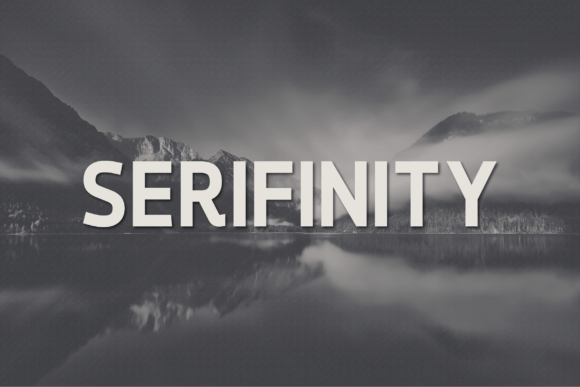
Choosing the right typeface often feels like a high-stakes decision because typography silently communicates your brand’s personality before a single word is read. Serifinity has emerged as a compelling option for designers and entrepreneurs seeking a bold, modern aesthetic that commands attention without unnecessary ornamentation. As an all-caps sans-serif font designed for clean, impactful visuals, it offers a distinct advantage for logos, headlines, posters, packaging, and digital content. However, its very strength—uncompromising boldness—is also where many users encounter friction. Understanding how to leverage Serifinity effectively requires moving beyond simple installation and recognizing the nuances of typographic hierarchy, spacing, and contextual application.
The Misconception of Universal Application
A frequent error when working with strong display fonts like Serifinity is assuming that "bold" equals "versatile" in every context. While this typeface is built for clarity and style, treating it as a universal solution for all text elements can degrade the user experience. Serifinity excels at creating a strong, confident look for branding, tech, fashion, and creative projects, but it is not designed for extended reading. Using an all-caps sans-serif for body copy or lengthy descriptions creates visual fatigue and reduces comprehension speed.
When you force a display font into a paragraph role, the uniform height of capital letters eliminates the word shapes that guide the eye during reading. This mistake often leads to designs that look aggressive rather than professional. The better approach is to treat Serifinity as the anchor of your visual hierarchy. Pair it with a neutral, highly legible sans-serif or serif for body text. Let Serifinity handle the heavy lifting in titles, navigation labels, and call-to-action buttons, while a supporting typeface manages the informational density. This contrast not only preserves readability but actually makes the boldness of Serifinity more effective by providing necessary negative space and visual relief.
Navigating Spacing and Kerning Adjustments
Another overlooked detail involves letter spacing. Because Serifinity includes standard Latin characters, punctuation, and numerals designed for impact, the default tracking may not suit every size or medium. A common pitfall is leaving the tracking too tight at smaller headline sizes or too loose at massive display scales. Tight spacing in bold, all-caps fonts can cause letters to visually merge, creating dark spots that hinder legibility. Conversely, excessive spacing can disconnect letters, making words difficult to parse quickly.
Before finalizing any design, manually adjust the tracking based on the specific point size and output medium. For large-format printing like posters or packaging, slightly tighter tracking often enhances cohesion. For digital interfaces or smaller subheads, opening up the tracking improves airflow and clarity. Do not rely solely on the software’s auto-kerning; test the typeface at actual viewing distances. What looks acceptable on a 27-inch monitor at 100% zoom may become illegible on a mobile screen or a printed business card. Taking five minutes to refine spacing prevents costly reprints and ensures the professional touch Serifinity is meant to provide remains intact across all touchpoints.
Evaluating Character Set Limitations Early
Enthusiasm for a font’s aesthetic sometimes overshadows practical due diligence regarding character support. Serifinity includes standard Latin characters, which covers most Western European languages and English. However, assuming this coverage extends to specialized symbols, currency signs, or extended language sets can derail a project mid-production. Discovering missing glyphs after laying out packaging for international markets or designing a multilingual website forces awkward substitutions that break visual consistency.
Always audit the character map before committing to Serifinity for global or technical projects. If your content requires accented characters beyond standard Latin, mathematical operators, or niche punctuation, verify their presence first. If gaps exist, plan your workaround before design begins rather than during crisis mode. Sometimes, the best choice is to use Serifinity for primary English headlines and select a complementary font with broader language support for secondary markets. This proactive evaluation saves time, maintains quality, and avoids the frustration of mismatched typography in critical deliverables.
Balancing Weight and Background Contrast
Bold minimalism relies heavily on contrast. A subtle but significant mistake occurs when users place Serifinity against backgrounds that compete with its weight. Placing heavy black type on a dark gray background, or white type on a pale pastel, reduces the perceived stroke width and undermines the font’s defining characteristic. In digital environments, poor contrast ratios also create accessibility barriers, excluding users with visual impairments and potentially violating compliance standards.
Test Serifinity against your intended color palette early in the process. Ensure sufficient luminance contrast between text and background. Remember that bold typefaces can appear thinner when reversed out (white text on dark background) due to ink spread in print or pixel rendering on screens. Compensate by slightly increasing weight or adjusting background darkness if necessary. For web applications, always validate color combinations against WCAG guidelines. Accessibility is not separate from good design; it is foundational to communication. When Serifinity is used with proper contrast, it delivers both style and inclusivity.
Licensing and Usage Rights Verification
Finally, never assume that downloading a font grants unlimited usage rights. Serifinity’s licensing terms dictate where and how you can deploy it. Using a personal license for commercial branding, embedding the font in a product for resale, or distributing it within a template without proper authorization exposes you to legal risk and ethical concerns. This oversight is particularly common among freelancers and small business owners who acquire fonts quickly without reading the EULA thoroughly.
Review the license agreement before purchase or download. Confirm whether the license covers desktop use, webfont embedding, app integration, or e-publishing. If your project scope expands—for example, moving from a local poster campaign to a national digital ad buy—verify that your current license accommodates the increased impressions or distribution. Proper licensing protects your work and respects the type designer’s labor. It also ensures you have access to updates and support, which contributes to long-term project stability. Treating font licensing as a core part of your workflow, rather than an afterthought, reflects the same professionalism that Serifinity brings to your visual identity.
Serifinity offers tremendous potential for creators willing to engage with it thoughtfully. By avoiding these common pitfalls—misapplying it as body text, neglecting spacing adjustments, overlooking character set limits, ignoring contrast requirements, and skipping license verification—you transform a simple font file into a reliable design asset. The result is work that feels intentional, polished, and authentically aligned with your message. Bold minimalism succeeds not through volume alone, but through disciplined execution that honors both form and function.